Project & Work Management

Plan the Work. Run the Work. Know the Work.

QuikProjects brings projects, tasks, sprints, documentation, testing, timesheets, reporting and team collaboration into one connected workspace. Replace the complexity of Jira + Confluence + TestRail + spreadsheets with one platform, one login and one source of truth for your entire project delivery lifecycle, starting at ₹99/user/month.
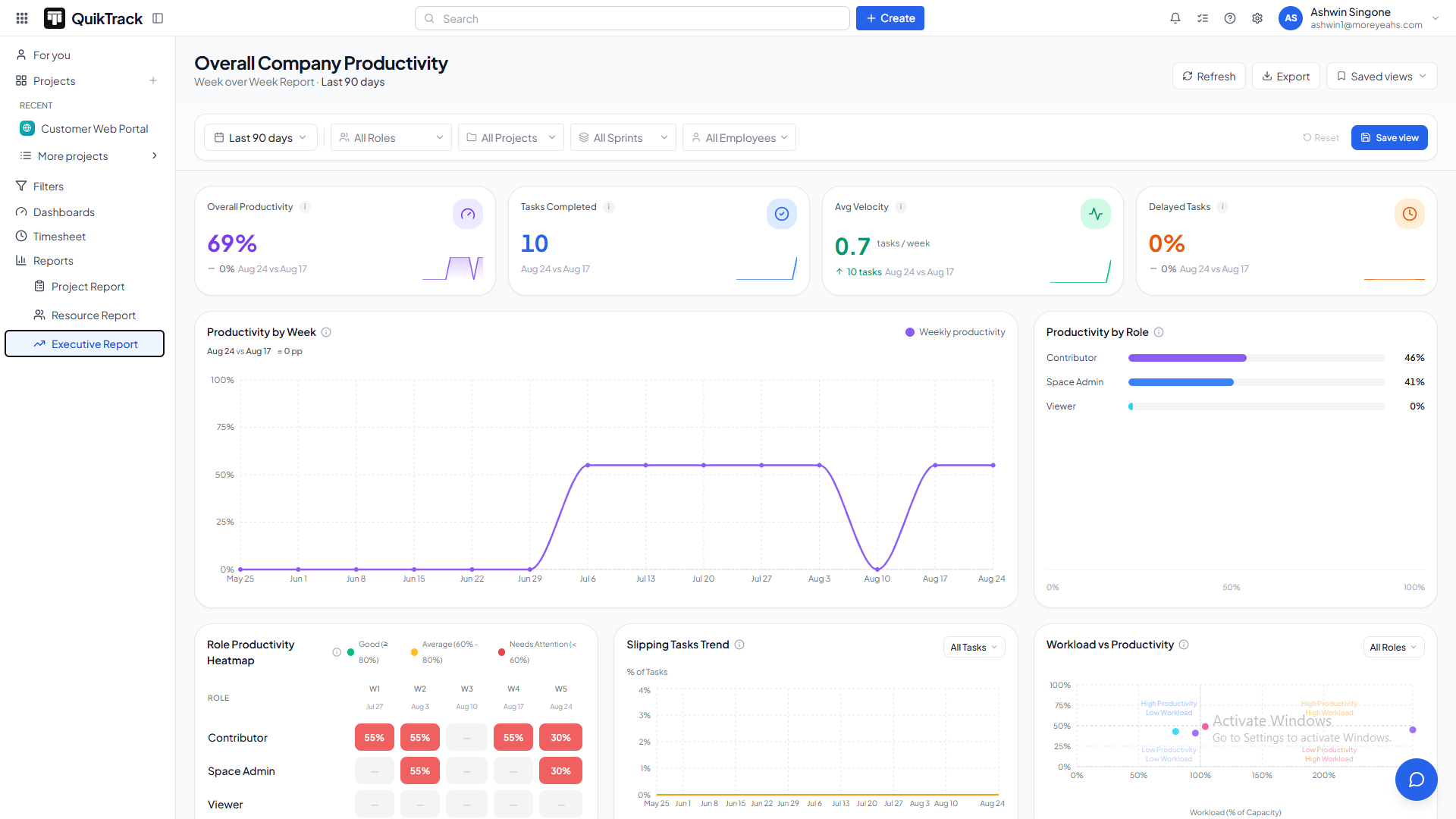
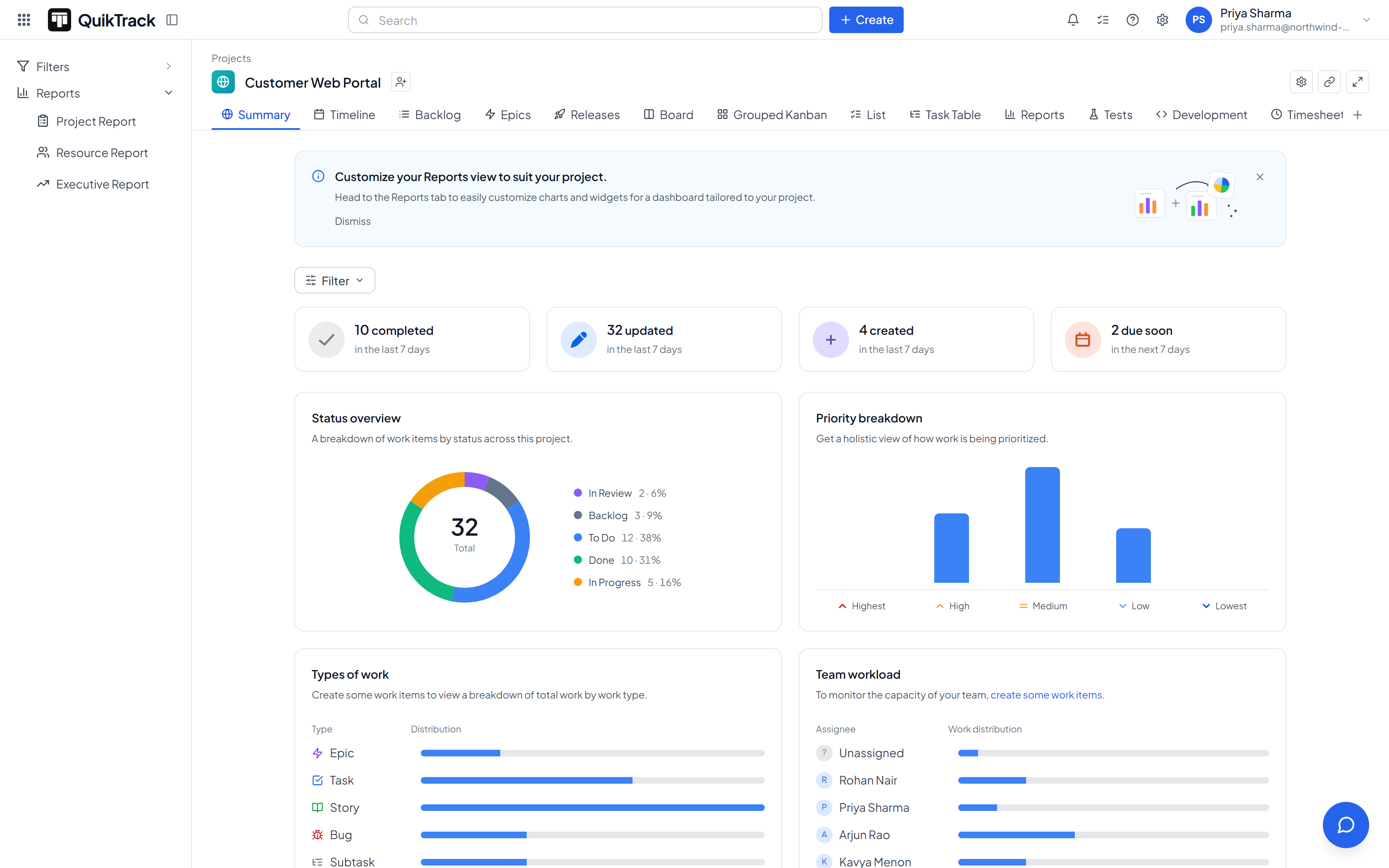
QuikProjects product screen

Connects Directly With the Tools Your Team Already Uses

Your code, identity, development workflow and business data shouldn’t live in isolation. QuikProjects connects with the tools your team already uses and brings the relevant signal back into one connected workspace.

GitHubJira CloudSSOREST APIEmail & @MentionsQuikCRMQuikInsightsQuikPeopleQuikFinance
The Problem

Your Team Is Working. But Can You See the Whole Picture?

Most teams don’t have a work problem. They have a visibility and coordination problem. Tasks live in one tool, documentation in another, testing somewhere else, time in spreadsheets and development activity in GitHub. Reporting then requires bringing everything together manually. The result?

Projects Get Delayed

Dependencies are missed, priorities shift and issues surface too late.

Managers Chase Updates

Project managers spend valuable time collecting status instead of managing delivery.

Information Gets Scattered

Requirements, tasks, documentation, testing and decisions live across disconnected systems.

Teams Lose Context

Product, engineering, QA and management often work with different pieces of the same project.

Reporting Takes Too Long

Hours are spent collecting information and preparing reports that can become outdated almost immediately.

Tool Costs Keep Growing

Project management, documentation, testing, time tracking and reporting often require multiple tools, subscriptions and logins.

More tools don’t necessarily create more control. They often create more work.

Why Use 4 Tools to Manage One Project?

Jira + Confluence + TestRail + Spreadsheets. Four tools, four logins, four permission models, and four places to manage project information. QuikProjects brings it all together with projects, documentation, testing, time tracking and reporting in one connected workspace. One tool, one login, one permission model and one source of truth.

How It Works

One Space. The Whole Project Lifecycle.

QuikProjects connects every stage of delivery, from the first idea to the final release, while giving your team continuous visibility into progress, resources and performance.

01 · Discover

Turn Ideas Into Structured Work

Capture product ideas, requirements and requests, prioritize opportunities, create epics and connect validated ideas directly to delivery. QuikProjects keeps the context connected from the first idea through execution, so your team always knows why the work matters and where it is going.

02 · Plan

Turn Priorities Into an Executable Plan

Build ranked backlogs, create stories and tasks, estimate work, plan sprints and manage dependencies. QuikProjects gives teams a clear, structured plan so everyone knows what needs to be done, who owns it and when it needs to happen.

03 · Deliver

Give Teams the Flexibility to Work Their Way

Manage work using Scrum, Kanban or configurable workflows with custom statuses, boards, swimlanes, issues and tasks. Teams can follow the process that works best for them while project managers maintain complete visibility into execution.

04 · Test

Bring QA Directly Into the Project

Create versioned test cases, organize test suites, execute test runs, manage defects and connect automation IDs directly to project work. Testing becomes an integrated part of delivery instead of a separate process disconnected from engineering.

05 · Release

Move Completed Work Into Controlled Releases

Define releases, track scope, roll up related work items and monitor release progress from the same workspace. QuikProjects keeps development, testing and delivery connected so nothing gets lost between completed work and the final release.

06 · Track & Report

Turn Project Activity Into Meaningful Visibility

Track time, manage timesheets, understand resource workload and monitor project performance through project, sprint, velocity and executive reports. Your team updates the work, while QuikProjects turns that activity into a clear picture of progress, effort and delivery health.

See It In Action

Every Tab, One Real Product.

Explore QuikProjects' interface — sprints, backlog, code health, and reporting, all in one workspace.

QuikProjects product screen — Project Summary
Everything Included

One Workspace. Every Project, On Track.

Everything your team needs to plan, execute and deliver, without the status-update overhead or the complexity of managing multiple disconnected tools.

01

Flexible Projects

Boards, lists, tables and timelines that adapt to how your team works.

02

Workflow Automation

Configure statuses, transitions, conditions and process automation around your team’s workflow.

03

Team Collaboration

Comments, files, updates and project discussions stay connected to the work itself.

04

AI Status & Risk

Turn project activity into clearer status visibility and identify work that may need attention before deadlines slip.

05

Timelines & Milestones

Plan schedules, dependencies, milestones and delivery dates across projects.

06

Task Dependencies

Connect related work so teams know what needs to happen before the next step can begin.

07

Workload View

Understand workload across team members and identify where work needs to be balanced.

08

Custom Views

Switch between board, list, table, timeline and other views without duplicating project data.

09

Cross-App Linking

Connect project work with the customers, people, goals and business information behind it.

10

Reporting & Dashboards

Monitor delivery health, resource utilization, velocity and executive metrics from the same project data.

For the Founder / CEO

Know Whether the Roadmap Is Real.

You shouldn’t need a weekly status meeting to understand whether your projects are on track. QuikProjects gives leadership a clearer view of delivery, workload, risk and performance from the same underlying data your teams use.

  • See projects that are on track and those at risk.
  • Understand workload and utilization across teams.
  • Identify project health issues before they become delivery problems.
  • Track slipping work and delivery trends.
  • See the same underlying project data your delivery teams see.
Delivery Health ScoreHow every project is tracking, before you read a single status update.
On-time delivery rate91% 14%
Active projects37
Hours spent1,240 hrs / 1,600 hrs
  • Board delivery reportReady to send
For the Project / Delivery Manager

Get Your Reporting Day Back.

Project managers should spend their time improving delivery, not rebuilding reports and chasing updates.

  • Track sprint progress, velocity and workload.
  • Compare planned, actual and overshot hours.
  • Manage timesheet approvals in the same workspace as the project.
  • Save and reuse frequently required views.
  • Filter and export project information quickly.
  • Reshuffle work in bulk when priorities change.

Less time preparing status. More time managing delivery.

Risk RadarMonitoring live
Tasks completed this month1,860
At-risk tasks flagged11
Tasks flagged for attention11 / 28
  • Reporting time per week4 hrs → 1 click
Why QuikProjects

The Board Is Only One Part of Project Management.

Most project management tools focus on the board. But the real complexity starts around it. Teams also need time tracking, documentation, reporting, testing, workflows, permissions, development visibility and external collaboration. QuikProjects brings those capabilities together instead of making teams assemble them across multiple products.

01

Time Tracking Is Native

Timesheets, approvals, time tracking and attendance work as part of the platform instead of requiring another tool or add-on.

02

Discovery and Delivery Stay Connected

Ideas, priorities, scores and the Epics they become remain connected throughout the delivery lifecycle.

03

Engineering Signals Meet Project Data

Bring development activity closer to project execution so teams can understand both delivery speed and engineering health.

04

Reporting Uses Permissioned Data

Project, resource and executive reports use the same underlying permissioned data, keeping visibility controlled and consistent.

05

Documentation and Sharing Are Built In

Keep project documentation connected to the work and share relevant information with clients and external stakeholders without unnecessary complexity.

06

Migration Is Designed for Control

Move from Jira with a guided migration process that lets you review what will be created, mapped or skipped before committing.

58%

Of the average knowledge worker's day goes to "work about work"

Status updates, chasing information, duplicating communication. — Asana, Anatomy of Work Global Index 2023

~1,200

App switches per day, per worker

Just under 4 hours a week — 9% of the work year — lost to reorienting. — Harvard Business Review, 2022

72%

Of organizations spend half a day or more, every month, collating status reports

— Wellingtone, State of Project Management Report 2026

36%

Of organizations mostly or always deliver projects on time

Only — the rest miss their own targets. — Wellingtone, State of Project Management Report 2026

Price Comparison

What Does It Actually Cost to Run a Team on Multiple Tools?

The project board is rarely the whole bill. Time tracking, documentation, reporting, dashboards and development insights often mean additional tools, add-ons or higher subscription tiers.

Teams also pay through:
  • Multiple subscriptions
  • Multiple logins
  • Tool switching
  • Duplicate information
  • Manual reporting
  • Lost context
  • Additional administration
  • Time spent chasing updates
The Typical Stack
CapabilityWhat It Usually Takes
Project ManagementJira / Asana / Monday / ClickUp
Time TrackingAdd-on or separate tool
DocumentationSeparate documentation platform
ReportingPremium or higher-tier reporting
Engineering InsightsSeparate development analytics
Assembled stack total₹1,950+ per user / month

Comparison figures are indicative list prices converted to INR. Actual cost depends on tier, seat count, and billing term.

QuikProjects
₹99 / User / Month

All of these capabilities in one connected platform.

  • Scrum, Kanban & Product Discovery
  • Work items and custom workflows
  • Timesheets and approvals
  • Documentation and external sharing
  • Project, Resource, Executive & Velocity reports
  • GitHub-connected development insights
  • Configurable dashboards
  • REST API
  • Guided Jira migration
  • External guest access
₹1,950+₹99 / User / Month

Stop paying for the stack around the board.

Same Board. Very Different Bill.

The board may look similar across project management platforms. The difference is what you need to pay for everything around it.

CapabilityQuikProjectsJiraAsanaMonday.comClickUp
Project ManagementIncludedIncludedIncludedIncludedIncluded
Scrum & KanbanIncludedIncludedIncludedIncludedIncluded
Time TrackingIncludedAdd-on / Higher TierHigher TierHigher TierHigher Tier
DocumentationIncludedSeparate / Higher TierHigher TierHigher TierIncluded
Executive ReportingIncludedHigher TierHigher TierHigher TierHigher Tier
DashboardsIncludedIncludedIncludedIncludedIncluded
Guest AccessIncludedHigher TierIncludedHigher TierHigher Tier
Jira MigrationIncluded
Price₹99HigherHigherHigherHigher
Trusted by Delivery Teams

Teams switch to QuikProjects and never build a manual status deck again.

We used to spend Friday afternoons building a status deck nobody read twice. Now the dashboard is the deck.
Delivery leadproduct studio
QuikProjects is the first tool where I can see risk before it becomes a missed deadline.
Program managerB2B SaaS company

Your Projects Shouldn’t Operate in a Silo.

Project execution is connected to people, customers, finance, support and business priorities. QuikProjects works independently, but becomes even more powerful when connected with the wider Quikit ecosystem.

Insights

From the Quikit blog

Ideas on building a connected, intelligent business — from the team behind the suite.

View all articles

QuikProjects — questions, answered

Still have questions? Talk to our team →

QuikProjects is a project and work management platform that helps teams plan, organize, execute, track and report on projects from one connected workspace.

Yes. QuikProjects provides project planning, task management, sprint planning, Kanban boards, backlogs, issue tracking, reporting, workflows and collaboration.

QuikProjects is designed for product, engineering, QA, project and delivery teams, as well as founders, managers and external stakeholders who need visibility into project execution.

QuikProjects can replace the combination of tools many teams use around Jira, including project management, documentation, testing and spreadsheets. It brings issues, sprints, backlogs, workflows, releases, reporting and test management into one connected platform.

QuikProjects includes project documentation and wiki capabilities for requirements, specifications, decisions, meeting notes and project knowledge. Existing content can also be imported from Word, PDF and Markdown.

Yes. QuikProjects includes test cases, test suites, test runs, test results, automation IDs and defect tracking.

Yes. Teams can use Scrum sprint planning and Kanban workflows depending on how they manage delivery.

Yes. Time tracking and timesheets are included as part of the platform, without requiring a separate time-tracking product.

Yes. Workflows, statuses, transitions, fields, issue types and board columns can be configured around your team’s process.

Yes. QuikProjects provides organization-level, project-level and field-level permissions to control what different users can access.

Yes. QuikProjects supports guided Jira migration, including projects, issues, comments, history and worklogs. A dry run helps you review the migration before committing.

Yes. External guests can receive controlled access to relevant projects or documents without requiring an internal paid licence seat.

Yes. QuikProjects connects development activity with project execution through GitHub integration.

No. QuikProjects works as a standalone product. Connecting other Quikit applications adds cross-functional business context when needed.

QuikProjects uses role-based access control, permissioned reporting, activity tracking and controlled API access to help protect project information.

Yes. QuikProjects provides REST APIs and an interactive API reference for building integrations.

QuikProjects starts at ₹99/user/month.

Ready to Run Delivery on One Platform?

Sprints, documentation, timesheets, reports and engineering insights in a single connected workspace, at a price that doesn’t punish you for adding the team.

No credit card required. Migrate from Jira with a dry run first. Cancel any time.

Stop chasing project updates. Start knowing what’s happening.